20210604 Git version 3.20.0 오류
in EnvOps on Blog, Github, Pages, Jekyll, Git, Push, Openssh
GitHub 블로그를 구축하는 과정에서 발생한 Git 에러와 그 해결 방법을 정리하고자 한다. Git 블로그에서는 로컬에서 수정한 포스트를 GitHub에 반영하기 위해 git push 명령어를 사용한다. 그러나 git push를 처음 사용하는 과정에서 OpenSSH 인증 단계로 넘어간 뒤, 서버가 응답하지 않는 문제가 발생할 수 있다. 본 포스트에서는 해당 문제 상황에서 출력되는 Git 디버깅 로그를 살펴보고, 이를 기반으로 해결 방법을 설명한다.
Git 에러 상세 설명
GitHub 블로그를 운영하다 보면 로컬에서 작성한 포스트를 원격 저장소에 반영하기 위해 git push 명령어를 자주 사용하게 된다. 이 과정은 일반적으로 문제없이 진행되지만, 환경에 따라 인증 단계에서 예상치 못한 문제가 발생하기도 한다.
이번에 직면한 에러는 git push를 실행한 뒤 OpenSSH 인증 단계로 넘어가는 과정에서 서버가 응답하지 않는 문제였다.

응답이 없는 원인을 구체적으로 파악하기 위해 디버깅 로그를 최대한 상세하게 출력했으며, 해당 로그는 아래와 같다.
 $ GIT_TRACE=1 GIT_TRANSFER_TRACE=1 GIT_CURL_VERBOSE=1 git push -u origin master
02:43:50.317253 exec-cmd.c:237          trace: resolved executable dir: C:/Program Files/Git/mingw64/bin
02:43:50.317253 git.c:455               trace: built-in: git push -u origin master
02:43:50.325254 run-command.c:667       trace: run_command: GIT_DIR=.git git remote-https origin https://github.com/ekspertos/ekspertos.github.io.git
02:43:50.349249 exec-cmd.c:237          trace: resolved executable dir: C:/Program Files/Git/mingw64/libexec/git-core
02:43:50.357248 git.c:744               trace: exec: git-remote-https origin https://github.com/ekspertos/ekspertos.github.io.git
02:43:50.357248 run-command.c:667       trace: run_command: git-remote-https origin https://github.com/ekspertos/ekspertos.github.io.git
02:43:50.405246 exec-cmd.c:237          trace: resolved executable dir: C:/Program Files/Git/mingw64/libexec/git-core
02:43:50.421242 http.c:774              == Info: Couldn't find host github.com in the (nil) file; using defaults
02:43:50.445240 http.c:774              == Info:   Trying 15.164.81.167:443...
02:43:50.469256 http.c:774              == Info: Connected to github.com (15.164.81.167) port 443 (#0)
02:43:50.469256 http.c:774              == Info: ALPN, offering h2
02:43:50.469256 http.c:774              == Info: ALPN, offering http/1.1
02:43:50.485238 http.c:774              == Info: successfully set certificate verify locations:
02:43:50.485238 http.c:774              == Info:  CAfile: C:/Program Files/Git/mingw64/ssl/certs/ca-bundle.crt
02:43:50.485238 http.c:774              == Info:  CApath: none
02:43:50.485238 http.c:774              == Info: TLSv1.3 (OUT), TLS handshake, Client hello (1):
02:43:50.493312 http.c:774              == Info: TLSv1.3 (IN), TLS handshake, Server hello (2):
02:43:50.501234 http.c:774              == Info: TLSv1.3 (IN), TLS handshake, Encrypted Extensions (8):
02:43:50.501234 http.c:774              == Info: TLSv1.3 (IN), TLS handshake, Certificate (11):
02:43:50.501234 http.c:774              == Info: TLSv1.3 (IN), TLS handshake, CERT verify (15):
02:43:50.501234 http.c:774              == Info: TLSv1.3 (IN), TLS handshake, Finished (20):
02:43:50.501234 http.c:774              == Info: TLSv1.3 (OUT), TLS change cipher, Change cipher spec (1):
02:43:50.501234 http.c:774              == Info: TLSv1.3 (OUT), TLS handshake, Finished (20):
02:43:50.501234 http.c:774              == Info: SSL connection using TLSv1.3 / TLS_AES_128_GCM_SHA256
02:43:50.501234 http.c:774              == Info: ALPN, server accepted to use h2
02:43:50.501234 http.c:774              == Info: Server certificate:
02:43:50.501234 http.c:774              == Info:  subject: C=US; ST=California; L=San Francisco; O=GitHub, Inc.; CN=github.com
02:43:50.501234 http.c:774              == Info:  start date: Mar 25 00:00:00 2021 GMT
02:43:50.501234 http.c:774              == Info:  expire date: Mar 30 23:59:59 2022 GMT
02:43:50.501234 http.c:774              == Info:  subjectAltName: host "github.com" matched cert's "github.com"
02:43:50.501234 http.c:774              == Info:  issuer: C=US; O=DigiCert, Inc.; CN=DigiCert High Assurance TLS Hybrid ECC SHA256 2020 CA1
02:43:50.501234 http.c:774              == Info:  SSL certificate verify ok.
02:43:50.501234 http.c:774              == Info: Using HTTP2, server supports multi-use
02:43:50.501234 http.c:774              == Info: Connection state changed (HTTP/2 confirmed)
02:43:50.501234 http.c:774              == Info: Copying HTTP/2 data in stream buffer to connection buffer after upgrade: len=0
02:43:50.501234 http.c:774              == Info: Using Stream ID: 1 (easy handle 0x2bb94867b88)
02:43:50.501234 http.c:721              => Send header, 0000000209 bytes (0x000000d1)
02:43:50.501234 http.c:733              => Send header: GET /ekspertos/ekspertos.github.io.git/info/refs?service=git-receive-pack HTTP/2
02:43:50.501234 http.c:733              => Send header: Host: github.com
02:43:50.501234 http.c:733              => Send header: user-agent: git/2.32.0.windows.1
02:43:50.501234 http.c:733              => Send header: accept: */*
02:43:50.501234 http.c:733              => Send header: accept-encoding: deflate, gzip, br, zstd
02:43:50.501234 http.c:733              => Send header: pragma: no-cache
02:43:50.501234 http.c:733              => Send header:
02:43:50.517251 http.c:774              == Info: TLSv1.3 (IN), TLS handshake, Newsession Ticket (4):
02:43:50.517251 http.c:774              == Info: TLSv1.3 (IN), TLS handshake, Newsession Ticket (4):
02:43:50.517251 http.c:774              == Info: old SSL session ID is stale, removing
02:43:50.709536 http.c:721              <= Recv header, 0000000013 bytes (0x0000000d)
02:43:50.709536 http.c:733              <= Recv header: HTTP/2 401
02:43:50.709536 http.c:721              <= Recv header, 0000000026 bytes (0x0000001a)
02:43:50.709536 http.c:733              <= Recv header: server: GitHub Babel 2.0
02:43:50.709536 http.c:721              <= Recv header, 0000000026 bytes (0x0000001a)
02:43:50.709536 http.c:733              <= Recv header: content-type: text/plain
02:43:50.709536 http.c:721              <= Recv header, 0000000054 bytes (0x00000036)
02:43:50.709536 http.c:733              <= Recv header: content-security-policy: default-src 'none'; sandbox
02:43:50.709536 http.c:721              <= Recv header, 0000000020 bytes (0x00000014)
02:43:50.709536 http.c:733              <= Recv header: content-length: 26
02:43:50.709536 http.c:721              <= Recv header, 0000000040 bytes (0x00000028)
02:43:50.709536 http.c:733              <= Recv header: www-authenticate: Basic realm="GitHub"
02:43:50.709536 http.c:721              <= Recv header, 0000000023 bytes (0x00000017)
02:43:50.709536 http.c:733              <= Recv header: x-frame-options: DENY
02:43:50.709536 http.c:721              <= Recv header, 0000000055 bytes (0x00000037)
02:43:50.709536 http.c:733              <= Recv header: x-github-request-id: E5DE:5CC8:546996:5C847B:60D372D5
02:43:50.709536 http.c:721              <= Recv header, 0000000002 bytes (0x00000002)
02:43:50.709536 http.c:733              <= Recv header:
02:43:50.709536 http.c:774              == Info: Connection #0 to host github.com left intact
02:43:50.709536 run-command.c:667       trace: run_command: 'git credential-manager-core get'
02:43:50.837386 exec-cmd.c:237          trace: resolved executable dir: C:/Program Files/Git/mingw64/libexec/git-core
02:43:50.837386 git.c:744               trace: exec: git-credential-manager-core get
02:43:50.837386 run-command.c:667       trace: run_command: git-credential-manager-core get
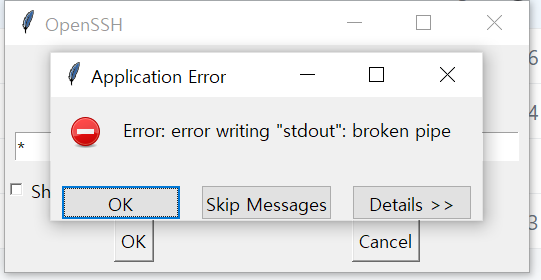
이후에도 별다른 응답이 없었고, Ctrl + C를 눌러 강제 종료한 뒤 다시 시도하자 OpenSSH 인증 팝업창이 뜨긴 했지만, 곧바로 에러 메시지가 발생하면서 더 이상 진행되지 않았다.
SSH 문제일 가능성을 의심해 방화벽 설정까지 변경해보았지만, 결과적으로는 불필요한 시도였다.
오류해결
구글링을 통해 동일한 문제를 겪은 사례를 찾을 수 있었다. https://github.com/microsoft/Git-Credential-Manager-Core/issues/364
그리고 해당 이슈에서는 우리가 찾고 있던 해결 방법도 함께 제시되어 있다.
git config --global credential.provider generic
위 명령어를 실행한 뒤 다시 git push를 수행하자, 정상적으로 인증 팝업이 뜨면서 Git 서버와의 연결이 이루어졌다.
마무리
이 글이 같은 문제를 겪는 분들에게 도움이 되어, 저처럼 불필요하게 시간을 낭비하지 않기를 바란다.